Do you have experience that you want to share with other developers or WordPress bloggers? Do you have a favorite Plugins or other WP modules that others must have? You have developed or released a new version of the WordPress Theme, Plugin, Widget?
I’ve installed PHP 5.2 at one of my testing computers today and a couple of bits of code that previously worked fine in version 5.1.6 threw fatal errors in the new version. The error message was “Nesting level too deep – recursive dependency?” and it took a little time » Read more: PHP Error Nesting Level Too Deep Recursive Dependency
I would like to describe some methods on how to write the processor for incoming mail. I had to use such manipulation to parse e-mails received from various sources. This can be useful for writing your own spam filter system, answering machine or ticket system to receive applications by e-mail.
To implement the e-mail parser algorithm we need
connect and log-on to e-mail server
count the number of incoming letters
recive e-mail from the server using POP3 protocol
process the e-mail headers and body and make parsing
… implement any additional actions
Ok, there is very specific task for PHP coding, so we need hosting that supports external connection. I do not propose to write decision entirely because much has been realized by talented programmers already. For example, you can take a ready module which will allow accept e-mails from a remote server.
Thank’s to Manuel Lemos and his module (php class) which named pop3.php.
To connect that class to your code, you just need to use include or require command: require(“pop3.php”);
<?require("pop3.php");$hostname='pop3.mail.com';$port='110';$user='pop3-username';$accesscode='pop3-password';// Create the class connection$pop3_connection=new pop3_class;// Specify the hostname$pop3_connection->hostname=$hostname;$result=$pop3_connection->Open();// We are trying to open connection and display the resultecho$result;// Trying to logon and display the error if any appear$error=$pop3_connection->Login($user,$accesscode,$apop);if($error<>'Password error: Logon failure: unknown user name or bad password.'){echo$error;exit;}// Now get the statistic how many emails are stored and the size of them $result=$pop3_connection->Statistics($messages, $size);echo"$hostname contains <b> $messages</b> of <b>$size</b> bytes.";//..... There we can receive e-mails in the cycle and parse them.... //// If nothing to do - we can close the connection$error=$pop3_connection->Close();//echo$error;?>
Now we know how to connect and log-on to the POP3 server and how to request the number of Inbox e-mails and them sizes. Next, we should receive each e-mail and parse the headers and body array.
It is good that today there are still programmers who write excellent software at no cost. What I am talking about? Want to tell you how I found another program for my collection of must-have utilities.
Apple MAC computers are widespread used in our office. This is the policy of the company. Despite the policy of the company, our boss prefers Windows and uses its featured laptop. Who should break the rules? Of course the boss, the rest is not allowed I must say that I share that preference, so I have installed Windows 7 to my home laptop.
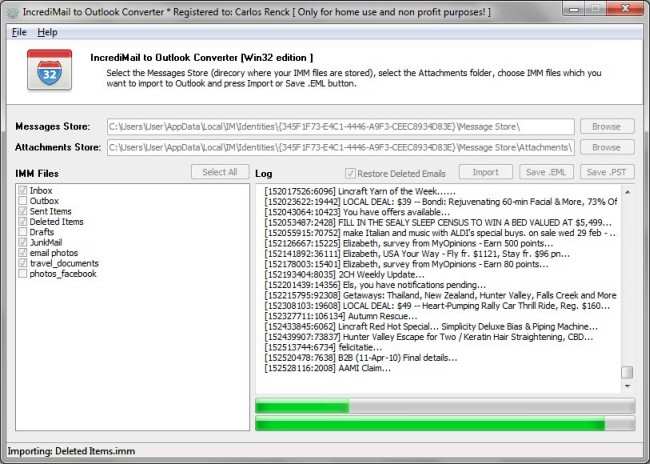
Our attorneys should pass some investigations from time to time and they should review the correspondence of our staff but they accepted only the files in the Outlook PST format.
In a previous article I wrote about incredibly necessary program Outlook Import Wizard, which saved me a lot of time when importing eml files into Outlook. The task that I had to complete just put me into shock. It is necessary to convert e-mails of our employees into the Outlook .pst file. How can we reconcile incompatible things? How to combine MAC OS with the Windows?
For a start I had to conduct an audit and found that our employees using various e-mail clients. There are just some of them: Turnpike, Mac Mail, Entourage, MailCopa, Thunderbird, Eudora, Berkeley Mail. The conversion task did not seem doable. I decided that if a search engine does not immediately bring me the solution, then I will say to my Boss that the mission is impossible. So I did search for the phrase “entourage, thunderbird, mac mail, to eml to pst free mbox” and the search was successful, it proved something I never expected. Moreover, the word FREE does not tally with me with the task that had to do. Imagine my surprise when on the description page of the another one eml to pst converter, I found the free mbox to eml converter.
The software review showed that despite the fact that the program is free, it has the incredible potential. Nevertheless the mailbox files format of different programs vary, the program was able accurately identify all meta signatures and correctly recognize the file format. I’m not kidding, all mailbox files Turnpike, Mac Mail, Entourage, MailCopa, Thunderbird, Eudora and Berkeley Mail were transformed into arrays of e-mail files in EML format. Having the Outlook Import Wizard at my hands allow me to import all eml files into Outlook PST.
Free MBOX to EML Converter works as a batch-processor. First you should select all necessary mbox files from which you want to retrieve eml messages. It is easy to select all files with the Shift key. After that, you need click the Processing button, point to the empty directory at your hard drive and wait for the result. The program processing all files sequentially, it creates a directory for each file and fill it with extracted eml files. In my case I had a lot of mailbox files that were named in accordance with user-names of our employees. Eventually I got a lot of folders, each had a user name and contained all corresponding eml files retrieved from the mailbox.
NASA! I found this video absolutely amazing. Twelve minutes of action of Space Shuttle parts. Start from the Earth and down to the sea. Space cameras on each part of shuttle, looks very interesting. Very beautiful Space Shuttle video.
STS-129 video highlights as compiled by the SE&I imagery team here at JSC from all of the ground, air, ET and SRB assets.
Today I faced with the problem. I tried to move my Windows Vista Mail.eml files to Windows 7 with MS Outlook. Vista Mail has been removed and all I have was the set of .eml files saved from Win Mail application. This was the huge message archive accumulated over several years. Thousands of emails. So it was important to me to save them and move into the new system, where I already installed the Microsoft Outlook.
I was surprised to know that Microsoft Outlook don’t want to import .eml files of Vista Mail directly. I tried to find the solution over the Internet and discovered that I was not the only one who faced with such problem.
I tried several software and chose the Outlook Import Wizard [ by http://www.outlookimport.com ] – utility, which not only import EML, MSG files to Microsoft Outlook but also transfers a directory structure from the hard drive to the Microsoft Outlook.
But Outlook Import Wizard good not only by this, it can convert .eml and .msg files to Microsoft Word .rtf, hypertext .html and other formats, so I can publish the correspondence to the WEB and store emails in an accessible format for viewing and analyzing. And the main thing – is that the price and quality of Outlook Import Wizard surpass all competitors.
What would you choose? To purchase several different tools individually or buy a bundle of opportunities for the same money.
In addition, I participate in the Christmas sale.
So the Outlook Import Wizard was purchased by me with the great discount for only $ 14. By the way, the coupon code is: OIW
There is another must-have utility in my collection and it will not stay without the action.
Outlook Import Wizard - it gets very simple to leave an old e-mail client for Microsoft Outlook (Vista Mail, Thunderbird, The Bat, Eudora, Mac-Mail, Entourage etc.)