Færslur ‘Last Topics’ flokki

Hvernig á að flytja EMLX skrá inn Outlook PST

3. júní, 2011

www.outlookimport.com

Hluti og Njóta

  • wp socializer sprite mask 16px How to import EMLX files into Outlook PST
  • wp socializer sprite mask 16px How to import EMLX files into Outlook PST
  • wp socializer sprite mask 16px How to import EMLX files into Outlook PST
  • wp socializer sprite mask 16px How to import EMLX files into Outlook PST
  • wp socializer sprite mask 16px How to import EMLX files into Outlook PST
  • wp socializer sprite mask 16px How to import EMLX files into Outlook PST
  • wp socializer sprite mask 16px How to import EMLX files into Outlook PST
  • wp socializer sprite mask 16px How to import EMLX files into Outlook PST
  • wp socializer sprite mask 16px How to import EMLX files into Outlook PST

Outlook Import Wizard–new version, new performance and new features.

May 8th, 2011

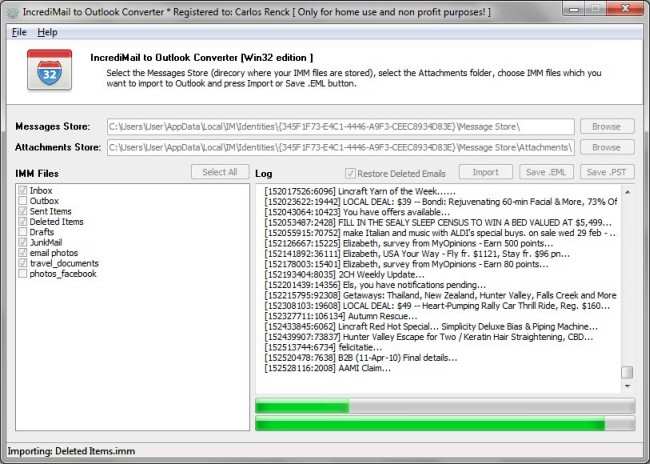
As more and more home and corporate users opt for Microsoft Outlook as their primary email and time management tool, the problem of transferring data from other email clients becomes a reality for an increasing number of people. Migrations involving thousands of emails in different encodings cannot be performed manually and require fast, efficient and easy to use tools that can help an average user successfully complete these tasks. Outlook Import Wizard is an all-in-one solution for transferring email archives in EML and MSG formats into Outlook’s native PST format. The recent release of the program adds plenty of useful features and offers increased performance and improved support of non-standard encodings.

Markham, ON, Canada— May 08, 2011: OutlookImport.Com gladly announces the release of a new version of Útsýni Import Wizard, its popular email conversion and migration tool that enables users to easily convert thousands of EML og MSG files into a single portable storage (PST) file that can be immediately used by Microsoft Outlook. The new version features a number of serious improvements aimed at making the program considerably faster and compatible with the most recent versions of Outlook.

Outlook 64-Bit Edition Support

Útsýni Import Wizard is now supplied with two executable files, 32- and 64-bit. Both versions are installed by default and users are free to choose the version they want to start. The 64-bit version is intended for Outlook 2010 64-bit Edition and will not work with other editions. This improvement gives a solid performance boost to all users of the 64-bit edition of Outlook thanks to much faster execution of 64-bit code.

Support for Unicode and UTF-8 Encodings

The email processing engine of the program was completely rewritten and improved, which made conversion several times faster. Útsýni Import Wizard now supports special characters in file names, which was a common problem among users migrating from Mac OS to Windows. Finally, full support of Unicode and UTF-8 in file names and message bodies helps avoid situations with indecipherable and unreadable messages appearing in destination PST files.

Multilanguage User Interface

The interface of the program also underwent changes. The options page has become a separate step of the wizard and users cannot miss it during the import process. The program now supports language packs that can be easily connected to the program. The list of currently available languages includes English, German, French, Russian, Italian, Spanish,Portuguese, Dutch, Swedish, Danish and Japanese. Potential contributors of localized files in other languages are very welcome and will get a free personal license as a sign of gratitude once their translation is validated and approved. Detailed instructions on translating the program’s language file will be provided upon request.

“Outlook Import Wizard has become a lot better,” confirms Atie Uhan, Senior Product Manager at OutlookImport.Com. “We completely replaced the email processing engine and its current version is several times faster than its predecessor. If you are converting 50 messages, relative speed may not be the most important thing, but if you are looking at several computers with a dozen thousand messages with attachments on each of them, any speed increase will be highly appreciated and will save you a good deal of time. We also made a few encoding-related tweaks and added multi-language support to the program. I hope our current and future users will like the result of our work.”

Útsýni Import Wizard offers an excellent combination of speed, ease of use and an affordable price. The program is capable of quickly converting large arrays of EML and MSG email files to the Outlook PST format preserving the folder structure and making sure all the texts remain readable.

Pricing and Availability

Outlook Import Wizard can be purchased for as low as $24.95 (individual 1-year license), while an unlimited individual license will cost just $59.95. Enterprise licenses start from $45.95 and site licenses allowing the use of the software by up to 100 employees in a single building or location can be purchased for $495.95. Two- and three-year options are also available for individual and business licenses. Detailed information about Outlook Import Wizard, an online help section, frequently asked questions, case studies and a free downloadable trial version of the program are available at OutlookImport.Com.

The software can be purchased through Plimus, PayPro Global and FastSpring, official resellers of OutlookImport.Com products. These platforms support nearly all existing payment methods, including major credit cards: VISA, MasterCard, Amex and Discover.

About OutlookImport.Com

OutlookImport.Com was founded by a group of professional software engineers and now offers a broad range of development services and products. Employing several certified professionals with years of experience in the software development industry, the company is committed to creating user-friendly, reliable and highly-focused software tools that efficiently solve users’ problems within a minimal time frame. The lead developer of the company, Atie Uhan, currently holds a position of a Senior Software Engineer in a major software company and is a recognized expert in the area of software compatibility and data conversion. He has contributed to the creation of multiple import, export and data exchange solutions for a number of popular applications. He is also the author of many articles published at OutlookImport.Com.

Product page link: http://www.outlookimport.com/description/outlook-import-wizard

Download link: http://www.outlookimport.com/downloads/oiwsetup.exe

Company website: http://www.outlookimport.com

P.S.: Today we found the stolen key code published to Internet. It is the old version of Outlook Import Wizard analog called EML to PST Converter. Pirate distributive file name: EML.to.PST.Converter.v4.0.9.0.incl.serial_iOTA.rar published by thief whos email is: kenneth.jackson@rdinn.com . Please be informed that stolen software in the pirate package includes Trojans. Unfortunately such search phrases as: EML to PST Converter Serial, EML to PST Converter keygen, EML to PST Converter free, are very popular in accordance with the search engines reports.
Hluti og Njóta

  • wp socializer sprite mask 16px Outlook Import Wizard–new version, new performance and new features.
  • wp socializer sprite mask 16px Outlook Import Wizard–new version, new performance and new features.
  • wp socializer sprite mask 16px Outlook Import Wizard–new version, new performance and new features.
  • wp socializer sprite mask 16px Outlook Import Wizard–new version, new performance and new features.
  • wp socializer sprite mask 16px Outlook Import Wizard–new version, new performance and new features.
  • wp socializer sprite mask 16px Outlook Import Wizard–new version, new performance and new features.
  • wp socializer sprite mask 16px Outlook Import Wizard–new version, new performance and new features.
  • wp socializer sprite mask 16px Outlook Import Wizard–new version, new performance and new features.
  • wp socializer sprite mask 16px Outlook Import Wizard–new version, new performance and new features.

Outlook Recovery, Innflutningur, Útflutnings-og viðskipta

4. Janúar, 2011

www.outlookimport.com

Hluti og Njóta

  • wp socializer sprite mask 16px Outlook Recovery, Import, Export and Conversion
  • wp socializer sprite mask 16px Outlook Recovery, Import, Export and Conversion
  • wp socializer sprite mask 16px Outlook Recovery, Import, Export and Conversion
  • wp socializer sprite mask 16px Outlook Recovery, Import, Export and Conversion
  • wp socializer sprite mask 16px Outlook Recovery, Import, Export and Conversion
  • wp socializer sprite mask 16px Outlook Recovery, Import, Export and Conversion
  • wp socializer sprite mask 16px Outlook Recovery, Import, Export and Conversion
  • wp socializer sprite mask 16px Outlook Recovery, Import, Export and Conversion
  • wp socializer sprite mask 16px Outlook Recovery, Import, Export and Conversion

Leggja veðja á Golf: Live Scores Golf And Golf Forgjöf

13. des, 2010

Fjárhættuspil á Golf er milljón dollara iðnaður. A einhver fjöldi af fólk svipað og fickleness af leiknum, heilla um samkeppnisaðila, og ýmsar leiðir sem þeir geta reisa veðmál á leik. The mælt aftur og slaka á anda Golf á milli mikil stundir gleði og spenna hefur lokið leik einn af mest tekið leiki til að veðja á

í vefur undirstaða íþróttum fjárhættuspil staður. Þúsundir manna um allan ríki gera veðmál á þessum vefsvæðum og horfa á Golf fjárhættuspil náið vona að veð þeirra eru sigurvegarar. Golf veðmál er laglegur undirstöðu. Þrír undirstöðu leiðir til að veðja á Golf er með því að hafa veðmál um hvernig leikmaður lýkur í samkeppni í samræmi við frammistöðu þeirra. A fjárhættuspilari geta veðja á the leikmaður til að vinna fyrsta sæti, veðja á the leikmaður til að setja á the toppur þrír, eða veðmál að battler mun ljúka á undan öðrum leikmanni. Líkurnar eru settar af bookies og hlauparar á fjárhættuspilum laug í samræmi við hvernig veðmálið er lokið.

Ef þú ert having a veðmál á þátttakanda í því skyni að vinna niðurstöður efst stuðla og hærra verðlaunafé aðallega ef leikmaður er ekki Tiger Woods, þá þú might vilja til að heyja á mann að leggja niðurstöður til að lækka líkur. En á höfuð til höfuð matchup, enginn er ekki sama sem lýkur fyrsta, annað eða þriðja. Allir þeir hugur um ef maðurinn sem þeir veðja á lýkur á undan strákur hann var samþykkt með. Annar samþykkt Golf veðja íþrótt er með því að gera leikmaður matchup eða höfuð til höfuð matchup sem felur í sér Golf fötlun. A fötlun er leið fyrir tvo leikmenn ólíkt kunnátta láréttur flötur til að hafa sanngjarna lota. Þetta er sérstakt flokkur veðmál og í rauninni pits frábær leikmaður gegn næstbesta í keppni.

The fötlun í þessu tilfelli er hægt að stilla með bookie eða krefjandi bettor. The sigurvegari í þessum leik er ákvarðað þegar gera niðurstöður mótsins eru settar og skorar á samsvarandi upp spilarar talið gegn hver öðrum með skorar venjulegum leikmannsins tekið til fötlunar. Ef betri leikmaður vinnur jafnvel með fötlun venjulegum leikmannsins, auka spilari vinnur. Þá aftur, ef skora af the venjulegur leikmaður sameiginlega með fötlun Ofanfall við ósigrandi skora á að betri leikmaður, meðaltal battler vinnur matchup. Þetta fatlaðra matchup er út af the venjulegur veðmál og er venjulega á milli tveggja manna eingöngu. Having a veðja á aðlaðandi leikmenn eins og Tiger Woods til að vinna mót er í raun ekki arðbær eins og hann er yfirleitt fá lágt peninga línu líkur. Bookies vita there 'a gegnheill breytingar sem Tiger vinnur og veðja á hann er ekki í sannleika stór hættu. Þetta er rök lágu líkur hans á betri laugar. Í veðmál Golf, Það er almennt auknum óþekktar stærðir sem eru veðmál á. Hver sá sem á fyrstu 10 eru veðja að leggja, og meirihluti veðmál eru lokið á matchup grundvelli eða höfuð til höfuð stíl til frekari ánægju.

Hluti og Njóta

  • wp socializer sprite mask 16px Laying A Bet On Golf: Live Golf Scores And Golf Handicap
  • wp socializer sprite mask 16px Laying A Bet On Golf: Live Golf Scores And Golf Handicap
  • wp socializer sprite mask 16px Laying A Bet On Golf: Live Golf Scores And Golf Handicap
  • wp socializer sprite mask 16px Laying A Bet On Golf: Live Golf Scores And Golf Handicap
  • wp socializer sprite mask 16px Laying A Bet On Golf: Live Golf Scores And Golf Handicap
  • wp socializer sprite mask 16px Laying A Bet On Golf: Live Golf Scores And Golf Handicap
  • wp socializer sprite mask 16px Laying A Bet On Golf: Live Golf Scores And Golf Handicap
  • wp socializer sprite mask 16px Laying A Bet On Golf: Live Golf Scores And Golf Handicap
  • wp socializer sprite mask 16px Laying A Bet On Golf: Live Golf Scores And Golf Handicap

The Magic of WordPress

December 9th, 2010

One of the premier web hosting sites is WordPress. WordPress is a company that is dedicated to helping their customers set up professional websites quickly and easily. There are numerous advantages to using WordPress as your web hosting platform. It offers a huge variety of template design options that enable a layperson to construct a professional website in just a few hours. Another benefit is that WordPress is search engine optimized, which means that your website will be prominently displayed in the search engine results. Additionally, WordPress allows you to quickly update your visitors through an RSS feed option.

Since WordPress is relatively easy to use and is very popular, there are thousands of plug-ins that allow you to customize your website design. WordPress is truly magical in allowing people who don’t know programming to design a great website. For example, if there is a specific function that you want your website to carry out, you can download the appropriate plug-in and activate it on your website by going to your WordPress account administration tab. With so many options available to WordPress users, the ability to creatively design a unique website is unparalleled.

For the best web hosting, WordPress is the gold standard. Because of the SEO that is already incorporated into the WordPress platform, the customer’s search engine ranking will be higher than it would be with many other website hosting sites. In order to keep your search engine results at a high ranking level, it is important to frequently update your website with original content. Additionally, when you post a sale or special event on your website, it will be found by the search engines more rapidly and your ranking will increase, so that you are closer to the top of the search engine results. This in turn will generate more traffic to your site and broaden your prospective customer base.

Another great aspect of WordPress is that it has a built-in RSS feed. An RSS feed is an efficient way for your visitors to be regularly updated about your activities. When new content has been added to your site or you have posted a new blog entry, the visitors who subscribe to your RSS feed are immediately notified via e-mail by WordPress. This function will save you a lot of time because the program does the work of updating your visitors for you.

Among the numerous web hosting sites, there are many advantages to using WordPress to design and host your website. The program is very user-friendly and quite customizable to fit your market niche. Auk, WordPress is already search engine optimized, so you will benefit from being highly-ranked in the search engine results. If you want to take a look at some websites that are designed with WordPress, here are a few excellent examples: The Department of Environmental Science at the University of Virginia, Ford Motor Company and Outreach Magazine.

If you are engaged in an online marketing campaign, consider utilizing the magic of WordPress. The platform will enable you to construct a great website with ease. With a professional website that you can update easily, you will be able to stay ahead of the competition and increase your market share

This post is contributed by Kirsten Ramsburg, a senior writer for a web hosting reviews company.

Hluti og Njóta

  • wp socializer sprite mask 16px The Magic of WordPress
  • wp socializer sprite mask 16px The Magic of WordPress
  • wp socializer sprite mask 16px The Magic of WordPress
  • wp socializer sprite mask 16px The Magic of WordPress
  • wp socializer sprite mask 16px The Magic of WordPress
  • wp socializer sprite mask 16px The Magic of WordPress
  • wp socializer sprite mask 16px The Magic of WordPress
  • wp socializer sprite mask 16px The Magic of WordPress
  • wp socializer sprite mask 16px The Magic of WordPress

PHP Villa hreiður Level Of Deep Endurkvæmt Yfirráðasvæði

12 mars, 2010

Ég hef sett upp PHP 5.2 á einn af tölvum próf mitt í dag og núna af bits af kóða sem áður starfaði fínn í útgáfa 5.1.6 kastaði banvæn villa í the nýr útgáfa. The villa skilaboð voru "hreiður stigi of djúpur - endurkvæma ánauðar?"Og það tók smá tíma

að elta uppi á rót vandans. Hér er það sem ég vil gera rangt.

Í PHP eru tveir saman rekstraraðila, == Og ===. Það er almennt vitað að fyrri er ekki strangur um tegund en öðrum er. Svo, td

echo ( falskur == 0 ); // sannur

echo ( falskur === 0 ); // rangar

- 0 er heiltala og falskur er Boolean

Vandamálið mitt reis frá því að nota ekki strangur slá með hluti.

$a = new MyObj();
$b = new MyObj();
ef( $a == $b )

Ég hafði ekki talið það sem ég var að gera með þennan kóða. Við samanburð á tveimur hlutum með því að nota ekki strangar miðað rekstraraðila (==) PHP saman allar eignir á hlutum og ef þeir passa hlutir eru taldar vera jöfn. Ef þeir passa að þeir eru ekki jafn. Í raun, við höfum endurkvæma samanburð á öllum þeim eiginleikum sem hver hlutur, og allar eignir þeirra, etc. þangað til við náum grunnupplýsingar tegundir eins og band og heiltölur.

If, Hins vegar, við notum ströngum samanburði (===), PHP mun athuga hvort tveggja hluta eru nákvæmlega sama hlut, ekki bara hlutir með sömu eiginleika.

bekk MyObj
{
opinber $ p;
}

$a = new MyObj();
$b = new MyObj();
$c = new MyObj();
$a->p = 1;
$b->p = 1;
$c->p = 2;
echo ( $a == $c ); // rangar
echo ( $a == $b ); // sannur
echo ( $a === $b ); // rangar

Vandamálið kemur upp ef þú ert með hringlaga tilvísanir í hluti þinn eignir. Svo, td

bekk MyObj
{
opinber $ p;
}
bekk OtherObj
{
opinber $ q;
}

$a = new MyObj();
$b = new OtherObj();
$a->p = $ b;
$b->q = $ a; // hringlaga tilvísun: $a->p->=== Q $ a

$c = new MyObj();
$d = new OtherObj();
$c->p = $ d;
$d->q = $ c;// annað hringlaga tilvísun: $c->p->q $ c ===

echo ( $a == $c ); // Banvæn villa:
Nesting level too deep – endurkvæma ánauðar?

Í því skyni að bera $ a í $ c, PHP verður að bera saman eiginleika þeirra. Þannig að röksemdafærsla í PHP fer eitthvað eins og this: $a == $c if $a->p == $c->p if $a->p->q == $c->p->q if $a->p->q->p == $c->p->q->p etc. endalaust.

PHP 5.1 virtist slétt yfir vandamál einhvern veginn (líklega eftir a viss láréttur flötur af Endurkvæmt fall það skilaði einfaldlega rangar) – og það venjulega í uppnámi út fínn. PHP 5.2 rétt framleiðir um banvæn villa fyrir ofan.

Þegar þú veist hvað vandamálið, lausnin er auðvelt – nota ströng samanburður.

echo ( $a === $c ); // rangar (og engin villa)

The strangur samanburður verður einfaldlega að athuga hvort tveggja hlutir eru á sama stað í minni og því ekki jafnvel líta á gildi eiginleika.

NB. Sama vandamál geta komið upp þegar þú notar negated samanburður rekstraraðila (nota !== Stað !=) og þegar in_array (þriðju breytu nota in_array að benda á ströngum samanburði).

Hluti og Njóta

  • wp socializer sprite mask 16px PHP Error Nesting Level Too Deep Recursive Dependency
  • wp socializer sprite mask 16px PHP Error Nesting Level Too Deep Recursive Dependency
  • wp socializer sprite mask 16px PHP Error Nesting Level Too Deep Recursive Dependency
  • wp socializer sprite mask 16px PHP Error Nesting Level Too Deep Recursive Dependency
  • wp socializer sprite mask 16px PHP Error Nesting Level Too Deep Recursive Dependency
  • wp socializer sprite mask 16px PHP Error Nesting Level Too Deep Recursive Dependency
  • wp socializer sprite mask 16px PHP Error Nesting Level Too Deep Recursive Dependency
  • wp socializer sprite mask 16px PHP Error Nesting Level Too Deep Recursive Dependency
  • wp socializer sprite mask 16px PHP Error Nesting Level Too Deep Recursive Dependency